 HeyPlanly
Debt Snowball vs Avalanche: Which Pays Off Debt Faster? (Same 5 Debts, Calculated)
Snowball pays the smallest balance first, avalanche pays the highest interest rate first. Everyone knows the definitions. Nobody shows the numbers. So here are the same five debts, run three ways in a spreadsheet, and what actually moved the debt-free date.
The two methods in one table
| Method | Pays first | Why people pick it | Downside |
|---|---|---|---|
| Snowball | Smallest balance | First debt gone fast, visible progress | Pays more interest if a big balance carries a high rate |
| Avalanche | Highest APR | Least total interest, mathematically optimal | First win can take a year if the high-rate debt is large |
| Custom | Your order | A family loan, a 0% promo that ends, a co-signed debt | You have to know why |
Both methods use the same rule underneath: pay minimums on everything, put every spare dollar on the target debt, and when the target is gone, its whole payment rolls into the next one. That rollover is the engine. The method only decides the order.
The same 5 debts, three ways
Sample debts from the tracker, typical mix of a household that has been carrying balances for a while:
| Debt | Balance | APR | Minimum |
|---|---|---|---|
| Credit card (Visa) | 4,200 | 24.99% | 120 |
| Car loan | 9,800 | 6.50% | 310 |
| Student loan | 15,000 | 5.20% | 180 |
| Medical bill | 1,300 | 0.00% | 50 |
| Personal loan | 3,500 | 11.90% | 150 |
| Total | 33,800 | 810 / month |
Way 1: minimums only, no rollover
Each debt paid at its minimum until it is gone, and when one is gone the money is simply not paid to anyone. This is what happens by default if you never make a plan.
- Credit card: 63 months, 3,399 interest
- Car loan: 35 months, 978 interest
- Student loan: 104 months, 3,651 interest
- Medical bill: 26 months, 0 interest
- Personal loan: 27 months, 500 interest
Debt-free in 8 years 8 months, total interest about 8,528. Nothing extra was paid, and still the last debt drags on for almost nine years because the student loan minimum barely covers its interest.
Way 2: same 810 a month, but with rollover (snowball, 0 extra)
Same total payment, no extra money. The only change: when the medical bill is gone, its 50 moves to the next debt, then that debt's payment moves on, and so on.
Debt-free in 51 months, total interest 6,304. That is 53 months sooner and 2,200 less interest from zero extra dollars, just from not letting freed-up payments disappear back into the budget.
Way 3: rollover plus 200 extra a month
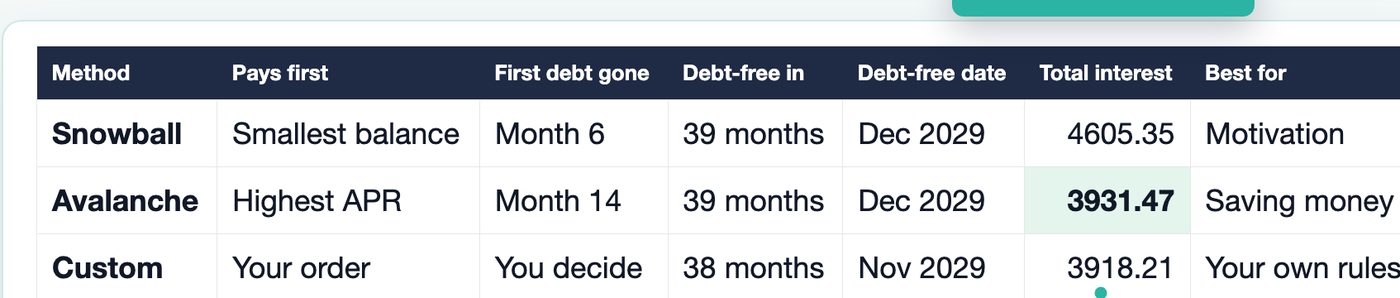
| Order | First debt gone | Debt-free | Total interest |
|---|---|---|---|
| Snowball (smallest balance first) | Month 6 (medical bill) | 39 months, Dec 2029 | 4,605.35 |
| Avalanche (highest APR first) | Month 14 (credit card) | 39 months, Dec 2029 | 3,931.47 |
| Custom (card, car, student, medical, personal) | You decide | 38 months, Nov 2029 | 3,918.21 |
Two things stand out. The debt-free month is the same for snowball and avalanche: the total you pay each month is identical, so the pile shrinks at the same speed. And the interest gap, 673.88, comes almost entirely from one card at 24.99%. Avalanche kills it first, snowball leaves it running until month 14 while it keeps charging. (The custom order in the table also starts with the card, which is why it lands next to avalanche.)
What moves the date more than the method

| Extra / month | Debt-free | Months | Total interest |
|---|---|---|---|
| 0 | Dec 2030 | 51 | 6,303.59 |
| 100 | May 2030 | 44 | 5,292.50 |
| 200 | Dec 2029 | 39 | 4,605.35 |
| 300 | Sep 2029 | 36 | 4,038.41 |
| 500 | Mar 2029 | 30 | 3,345.14 |
Switching snowball to avalanche saved 674. Finding 100 more a month saved 1,011 and five months. Finding 300 more saved almost 3,000 and nearly two years. If you only have energy for one decision, make it the extra payment, then pick whichever order you will actually stick to.
Calculate your own numbers in Google Sheets
You do not need a template for the per-debt math. Put your debts in four columns (name, balance, APR, monthly payment) starting in row 2, then add two formulas.
Months to pay off one debt (balance in B2, APR in C2, payment in D2):
=NPER(C2/12, -D2, B2)
Interest you will pay on it:
=D2*NPER(C2/12, -D2, B2) - B2
Fill both down. If a debt is at 0% APR, NPER divides by zero, so wrap it: =IF(C2=0, B2/D2, NPER(C2/12,-D2,B2)). If the payment does not even cover the monthly interest, NPER returns an error, which is the spreadsheet telling you that debt never ends at that payment.
Order the list. For snowball, sort by balance ascending. For avalanche, sort by APR descending. Or leave the data alone and add a rank column:
=RANK(C2, $C$2:$C$20, 0)     ← avalanche priority (highest APR = 1)
=RANK(B2, $B$2:$B$20, 1)     ← snowball priority (smallest balance = 1)
That gives you Way 1 above: each debt on its own, which is already useful for spotting the debt that never ends. What these formulas cannot do is the rollover. When debt 1 is paid, its payment jumps to debt 2, which changes debt 2's months, which changes when debt 3 gets the bigger payment, and so on for every debt in the list. That is a month-by-month table, 120 rows deep, one block per debt, with the freed-up minimums flowing to the current target.
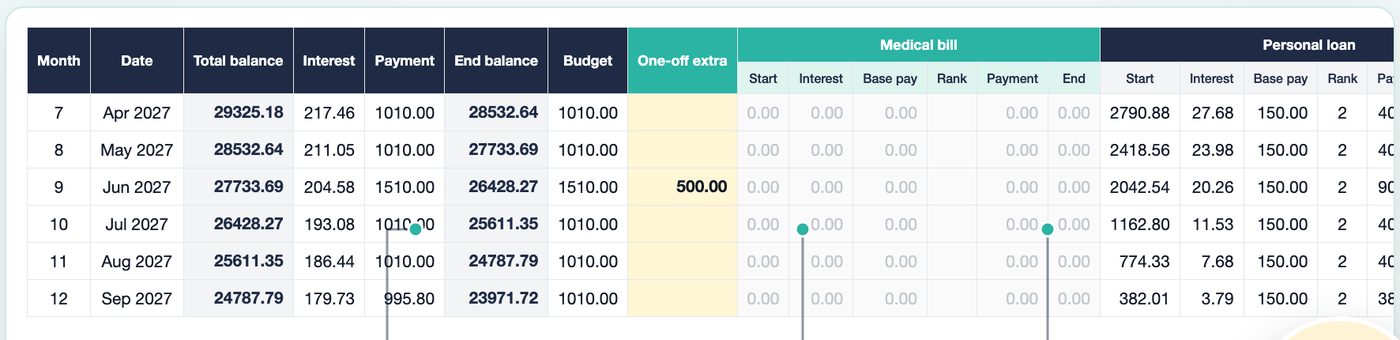
Building that table by hand is an afternoon, and it breaks the first time you add a sixth debt. That is the part I turned into a template.
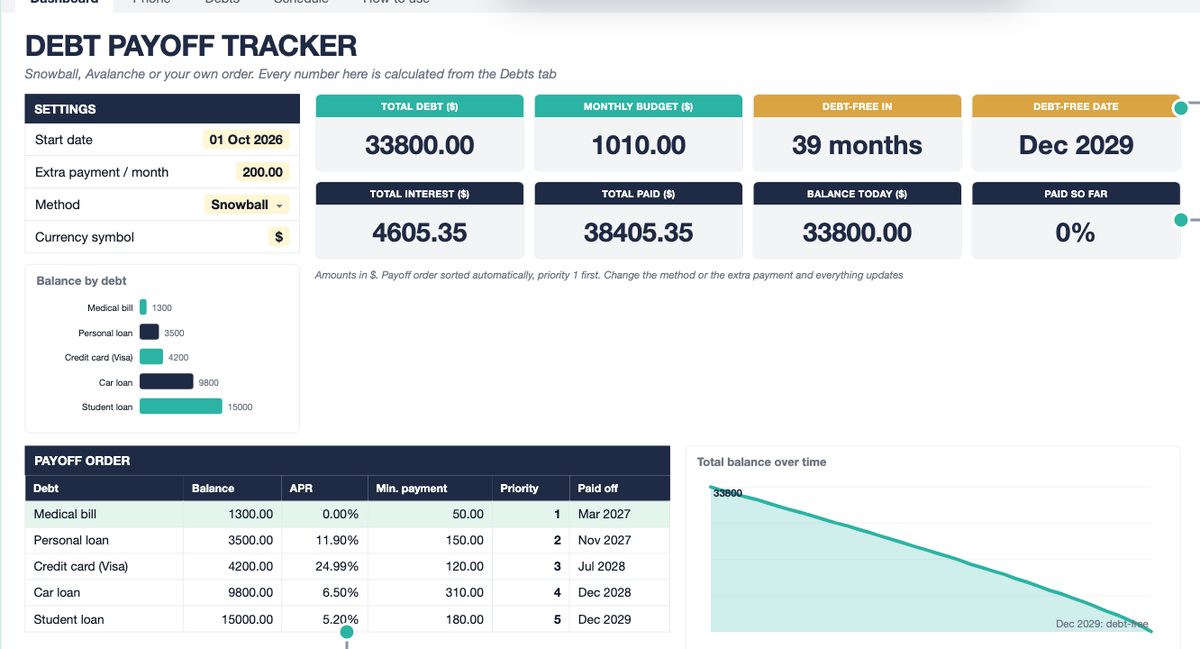
Debt Payoff Tracker for Google Sheets and Excel
Type up to 25 debts in the yellow cells, pick Snowball, Avalanche or Custom from one dropdown, and the dashboard shows your debt-free date, total interest, the payoff order and what to pay on each debt this month. 120-month schedule, one-off extras in any month, a payments log for what you actually paid. No formulas to touch.
Get the tracker on Etsy →Which one should you pick?
- One debt has a much higher rate than the rest (a card at 20%+ next to loans under 10%): avalanche. That is where the interest gap lives. In the sample, it is the whole 674.
- Rates are all within a few points of each other: the methods are nearly identical in cost. Take snowball for the early win.
- You have quit a payoff plan before: snowball. A debt gone in month 6 is the thing that keeps month 7 happening.
- A 0% promo ends on a known date, or a loan is from family: custom order. Put it where it needs to be and let the rest follow avalanche.
- Whatever you choose: set the rollover up so it happens automatically, and revisit the extra payment every few months. Those two decisions are worth more than the method.
See the tracker work
Two minutes: what you type, what is calculated, and how the method dropdown rebuilds the plan.
Need only the debt side? That is what this tracker does, on purpose. For income and bills there is a separate Annual Budget Spreadsheet and a Paycheck Budget that pair with it.
FAQ
Is the debt avalanche always cheaper than the snowball?
In theory the highest-APR-first order is the cheapest. In a real month-by-month plan another order can land within a few dollars of it because of how the last payments fall (in the sample, a custom order came in 13 lower than avalanche, and avalanche 674 lower than snowball). The gap that matters comes from rate differences: one 25% card next to loans under 12%. If all your debts sit at similar rates, the methods cost about the same.
Does the snowball really pay off debt faster?
Not in calendar months. In the sample, both methods finish in 39 months because the total monthly payment is the same. Snowball pays off the first debt sooner (month 6 instead of month 14), which is the motivation argument. The debt-free date moves when you change the extra payment, not the method.
Can I calculate a debt snowball in Google Sheets without a template?
Per debt, yes: NPER gives months to payoff and payment × months − balance gives interest. The part that needs a schedule is the rollover: when debt 1 is gone, its payment moves to debt 2, which changes debt 2's months, which changes debt 3, and so on. That is a month-by-month table, not a single formula.
What if one of my debts is at 0% APR?
Avalanche puts it last, which is correct for interest. If the 0% promo ends on a date, use a custom order and move it up so it is gone before the rate jumps. The tracker has a Custom method for exactly this.
What extra payment should I use?
Whatever you can repeat every month. A number you can keep for 39 months beats a bigger one you drop in month 4. Start with the minimums plus what your budget actually leaves, then add one-off extras (a refund, a bonus) in the months they happen.
More from the blog
- How to Price Handmade Products: Materials, Labor, Fees and ProfitA worked pricing example for handmade products: an 8 oz soy candle that costs 11.29 to make needs 23.99 on Etsy for a 40% margin after fees. Formulas, a price ladder from 20% to 70%, fee comparison and break-even.
- Home Bakery Pricing: Cost Per Serving, Cake Quotes and Your MarginHow a home bakery spreadsheet prices a cake by servings: 36 servings at 7.50 each, 342.38 with tax, a 50% deposit, and 173.67 of profit on a 149.33 cost, plus a bake plan built from confirmed orders.
- Side Hustle Bookkeeping: Profit and Loss in One TabHow a small business bookkeeping spreadsheet turns 35 income rows and 40 expenses into a monthly profit and loss: 12758.50 in, 4405.39 out, 8353.11 profit, a 65.5% margin and a quarterly tax set-aside.
- Subscription Tracker: What Your Subscriptions Cost Per YearWhat a subscription tracker spreadsheet shows for a list of 24 subscriptions: 310.32 a month and 3,723.87 a year once yearly, quarterly and weekly plans are normalized, 6 charges due in the next 7 days, a trial ending, and 5 unused subscriptions worth 875.63 a year.