 HeyPlanly
How to Budget a Biweekly Paycheck in Google Sheets (26 Paychecks, 12 Months of Bills)
A monthly budget assumes money arrives once a month. Biweekly pay arrives 26 times a year, which is not 12 × 2. Two months a year you get three paychecks, the rent always lands on the same one, and "I make 4,800 a month" is true in ten months and wrong in two. Here is how to budget by paycheck instead, with the numbers from the template's sample.
The 26 vs 12 problem
Take a biweekly paycheck of about 2,400. Two paychecks a month feel like 4,800 a month. But 26 paychecks × 2,400 = 62,400 a year, and 62,400 ÷ 12 = 5,200 a month. That is a 400-a-month gap between how it feels and what it is. The gap arrives as two "extra" paychecks a year, in the two months that have three pay dates.
Which months? It depends on your first pay date. For the sample schedule (first paycheck Friday, September 4, 2026, then every 14 days) the pay dates fall like this:
| Month | Pay dates | Paychecks |
|---|---|---|
| September 2026 | Sep 4, Sep 18 | 2 |
| October 2026 | Oct 2, Oct 16, Oct 30 | 3 |
| November 2026 to March 2027 | two each | 2 |
| April 2027 | Apr 2, Apr 16, Apr 30 | 3 |
| May to September 2027 | two each | 2 |
| October 2027 | Oct 1, Oct 15, Oct 29 | 3 |
Shift the first pay date by a week and the three-paycheck months move. There is no rule of thumb; you have to list the dates. Which is the first thing the spreadsheet does.
Step 1: list the pay dates
One yellow cell with the first pay date, then a formula that adds 14 days, filled down for as many periods as you want (the template does 60, a bit over two years).
B6:  2026-09-04          ← first pay date, typed
B7:  =B6+14              ← fill down
Now number each paycheck within its month. This is the column that makes bill assignment possible: it answers "is this the 1st, 2nd or 3rd paycheck of the month?" for every row.
=COUNTIFS($B$6:$B$65, ">="&DATE(YEAR(B6),MONTH(B6),1), $B$6:$B$65, "<="&B6)
It counts pay dates from the first of the month up to this one. A third paycheck gets a 3, and you can see the three-paycheck months without a calendar.
Step 2: assign every bill to a paycheck
The sample has 12 recurring bills, 2,437 a month. Each one has a due day and a paycheck number: bills due early in the month come out of paycheck 1, bills due after the second pay date come out of paycheck 2.
| Bill | Amount | Due day | Paycheck |
|---|---|---|---|
| Rent | 1,400 | 1 | 1 |
| Spotify | 11 | 3 | 1 |
| Netflix | 16 | 5 | 1 |
| Gym | 35 | 8 | 1 |
| Renters insurance | 15 | 10 | 1 |
| Electricity | 95 | 12 | 2 |
| Internet | 60 | 15 | 2 |
| Student loan | 180 | 18 | 2 |
| Car payment | 320 | 20 | 2 |
| Car insurance | 110 | 22 | 2 |
| Phone | 45 | 25 | 2 |
| Credit card minimum | 150 | 28 | 2 |
| Paycheck 1 / Paycheck 2 / Total | 1,477 / 960 / 2,437 |
The bills per paycheck is one SUMIFS: sum the Amount column where the Paycheck column equals this row's paycheck number.
=SUMIFS(Bills!$D$6:$D$45, Bills!$I$6:$I$45, J6)
   D = amounts, I = paycheck number, J6 = this row's paycheck-of-month
Then left over = income − bills − planned spending − savings, per row. Here is what the two sample paychecks look like:
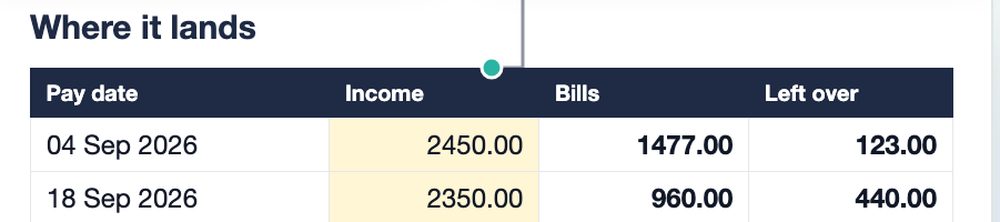
| Pay date | Income | Bills | Planned spending | To savings | Left over |
|---|---|---|---|---|---|
| Sep 4 (paycheck 1) | 2,450 | 1,477 | 650 | 200 | 123 |
| Sep 18 (paycheck 2) | 2,350 | 960 | 650 | 300 | 440 |
A monthly budget would show 4,800 income, 2,437 bills, 1,300 spending, 500 savings and 563 left, and everything looks fine. The paycheck view shows that the first half of the month runs on 123. That is the number that decides whether the card gets used on the 10th.
Step 3: fix the lopsided paycheck
Rent on paycheck 1 is the usual reason the first half of the month is tight. Three ways to even it out, in order of how much they change:
- Move small bills. Anything with a due day near the second pay date can move to paycheck 2. In the sample, the split is already 1,477 vs 960, and rent alone is 1,400: there is not much left to move. Which leads to the next option.
- Uneven savings. Put 100 to savings from paycheck 1 and 400 from paycheck 2 instead of 200 / 300. Total savings unchanged, paycheck 1 leaves 223 instead of 123.
- Get one paycheck ahead. Keep one full paycheck in the account as a buffer, so the rent due on the 1st is paid from the paycheck that arrived two weeks before. The third paycheck in October is the easiest way to build that buffer once, and after that the calendar stops mattering.
Step 4: what to do with the third paycheck
In a three-paycheck month, paychecks 1 and 2 still carry every bill. Paycheck 3 owes nothing but its own planned spending. In the sample that is about 2,400 income − 650 spending = 1,750 free, twice a year. Decide in advance where it goes, or it goes to nothing in particular:
- the one-paycheck buffer from step 3 (once);
- the highest-APR debt (the snowball vs avalanche article shows what a one-off extra does to the debt-free date);
- a sinking fund for the next irregular bill: car insurance renewal, holidays, a trip.
Skip the build
The three formulas above give you the core: pay dates, paycheck-of-month and bills per paycheck. What they do not give you is the bill calendar for the month, the "due in the next 7 days" list, a 600-row expense log matched to the right paycheck by date, and sinking funds with paychecks-to-go. That is the template.
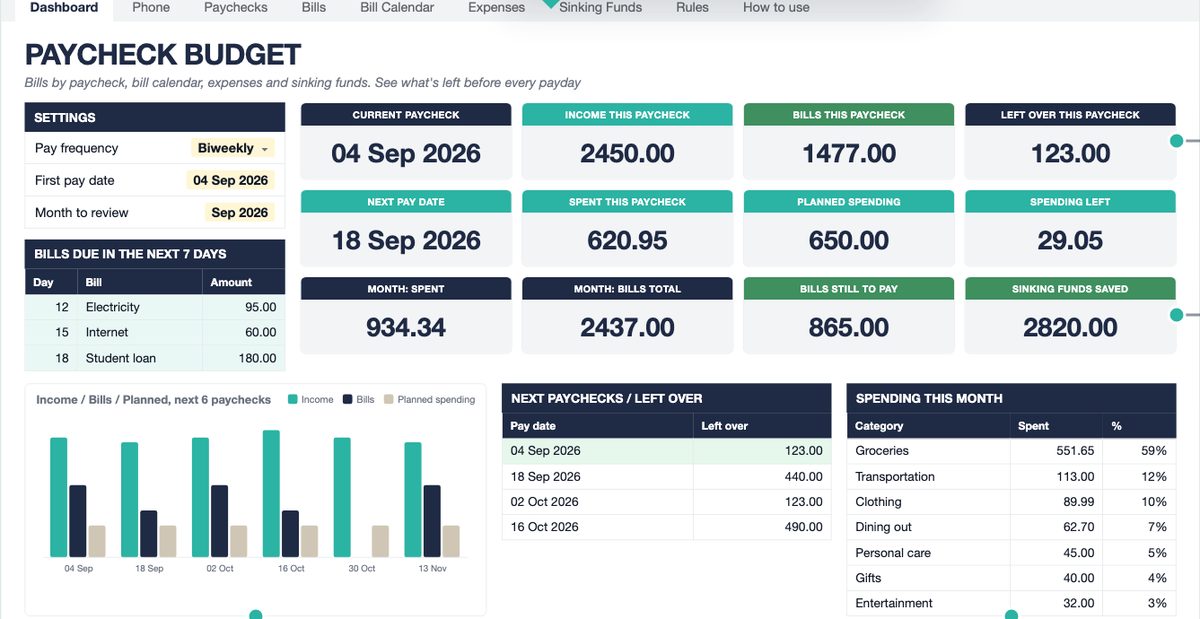
Paycheck Budget Spreadsheet for Google Sheets and Excel
Set the pay frequency and the first pay date, type each bill once with its due day and paycheck number, and every pay date shows income, bills, planned spending, savings and left over. Bill calendar, expenses log with auto-categories, sinking funds, 60 pay periods. Lite (4 tabs) and Full (10 tabs) in one purchase.
Get the Paycheck Budget on Etsy →Only need the pay dates and bills per paycheck? The Simple Paycheck Budget is the one-tab version.
See it work
FAQ
Which months have three paychecks in 2027?
It depends on your first pay date. If you were paid on Friday, September 4, 2026 and every two weeks after, the three-paycheck months are October 2026, April 2027 and October 2027. Any biweekly schedule gets exactly two of them per year; list your pay dates in a column and count them per month to find yours.
Should I budget by month or by paycheck if I am paid biweekly?
By paycheck. Bills have due days, paychecks have pay dates, and the question you actually have is whether the money for the rent is in the account on the 1st. A monthly total cannot answer that. A paycheck budget assigns each bill to the paycheck it comes out of, so every pay date shows its own left-over number.
What should I do with the third paycheck?
First check that it is really extra: in a three-paycheck month, paychecks 1 and 2 still carry all the bills, so paycheck 3 only owes its own planned spending. The rest is free. Put it toward the highest-interest debt, an emergency fund, or the next big irregular bill (car insurance, holidays).
My first paycheck of the month is always short because rent lands on it. How do I fix that?
Three options. Move the smaller bills to paycheck 2 so the split is closer to even. Ask your landlord or lender to move the due day. Or keep one paycheck ahead: hold one paycheck in the account as a buffer, so rent is paid from money that arrived two weeks earlier. The template shows the left-over per paycheck, so you can see the fix working before you commit.
Can I use a paycheck budget if I am paid weekly or twice a month?
Yes. Weekly has 52 paychecks and four five-paycheck months; semi-monthly (1st and 15th) has exactly 24 and no extra months. The template has a frequency dropdown for weekly, biweekly, semi-monthly and monthly; the pay dates and the paycheck-of-month numbers rebuild themselves.
More from the blog
- How to Price Handmade Products: Materials, Labor, Fees and ProfitA worked pricing example for handmade products: an 8 oz soy candle that costs 11.29 to make needs 23.99 on Etsy for a 40% margin after fees. Formulas, a price ladder from 20% to 70%, fee comparison and break-even.
- Home Bakery Pricing: Cost Per Serving, Cake Quotes and Your MarginHow a home bakery spreadsheet prices a cake by servings: 36 servings at 7.50 each, 342.38 with tax, a 50% deposit, and 173.67 of profit on a 149.33 cost, plus a bake plan built from confirmed orders.
- Side Hustle Bookkeeping: Profit and Loss in One TabHow a small business bookkeeping spreadsheet turns 35 income rows and 40 expenses into a monthly profit and loss: 12758.50 in, 4405.39 out, 8353.11 profit, a 65.5% margin and a quarterly tax set-aside.
- Subscription Tracker: What Your Subscriptions Cost Per YearWhat a subscription tracker spreadsheet shows for a list of 24 subscriptions: 310.32 a month and 3,723.87 a year once yearly, quarterly and weekly plans are normalized, 6 charges due in the next 7 days, a trial ending, and 5 unused subscriptions worth 875.63 a year.