 HeyPlanly
Church Budget Template: How a Small Church Plans a Year in Google Sheets (Funds, Budget vs Actual, Treasurer Report)
A church treasurer has one job the family budget never asks for: explaining to a board that the church has 69,603.50 in the bank and also cannot afford a new heater. The reason is funds. Most of that money was given for the building, and the General fund that pays the bills is a different, much smaller number. Here is how a small church budget works in a spreadsheet, using the nine months of sample data inside the template: 262 transactions, 5 funds, 9 expense categories and a report for August.
One row per gift or bill
Everything starts on the Transactions tab. One row per gift or bill, and only the yellow cells are typed: date, Income or Expense, fund, category, who, amount, method and a note. Month and year are calculated from the date so the report can filter on them. The sample has 177 gifts and 85 bills from 1 January to 28 September 2026, paid 104 times online, 92 by check, 42 in cash and 24 by card.
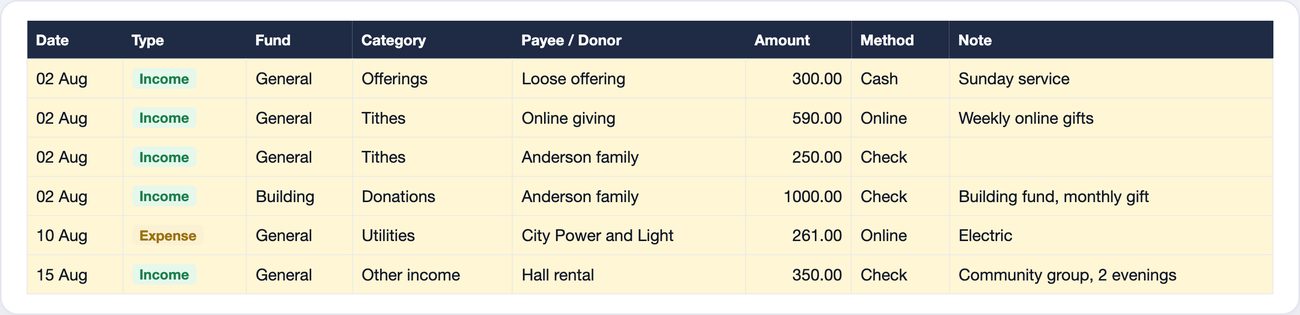
Two habits make the rest of the file work. Anonymous cash is one row per Sunday under the name Loose offering (five rows in August: 300, 353, 406, 289 and 342), weekly online gifts go under Online giving, and named checks get the donor's name with the same spelling every time. By September, Online giving is 23,914 (28.6% of all income), Loose offering 15,958 (19.1%), and 18 named donors make up the rest.
The August treasurer report
The Report tab has three yellow cells that matter: month, year and organization. Pick August and the page rebuilds. Every category row is one SUMIFS for the month and one for year to date:
=SUMIFS(Transactions!$G$6:$G$1005,
        Transactions!$C$6:$C$1005, "Income",
        Transactions!$E$6:$E$1005, $B15,        ← category
        Transactions!$J$6:$J$1005, $C$9,        ← month number
        Transactions!$K$6:$K$1005, $C$6)        ← year
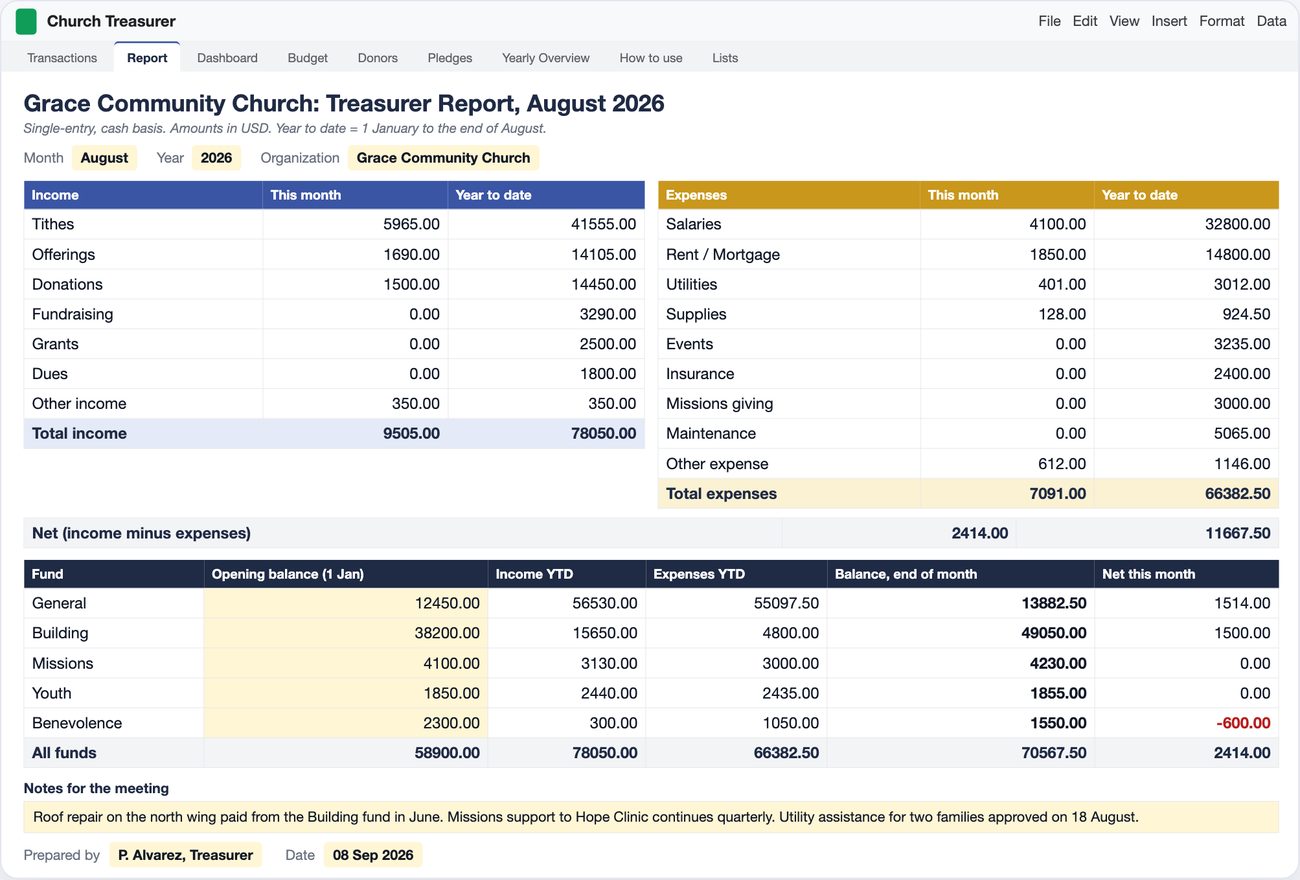
The year-to-date column is the same formula with "<="&$C$9 in place of $C$9, so it sums January through the report month. For August that gives income 9,505 (tithes 5,965, offerings 1,690, donations 1,500, hall rental 350), expenses 7,091 (salaries 4,100, mortgage 1,850, utilities 401, supplies 128, 612 of utility assistance for two families) and a net of 2,414. Year to date: 78,050 in, 66,382.50 out, net 11,667.50.
Funds: the number the board actually needs
The bottom of the report is the fund table. Each fund has an opening balance typed once (what it held on 1 January), then income and expenses to date and a balance at month end:
Balance, end of month:  =C44 + D44 - E44
D44 (income YTD):  =SUMIFS(Transactions!$G$6:$G$1005, Transactions!$C$6:$C$1005,"Income",
                           Transactions!$D$6:$D$1005,$B44, Transactions!$J$6:$J$1005,"<="&$C$9,
                           Transactions!$K$6:$K$1005,$C$6)
| Fund | Opening (1 Jan) | Income to Aug | Expenses to Aug | Balance, end Aug | Net in Aug |
|---|---|---|---|---|---|
| General | 12,450.00 | 56,530.00 | 55,097.50 | 13,882.50 | 1,514.00 |
| Building | 38,200.00 | 15,650.00 | 4,800.00 | 49,050.00 | 1,500.00 |
| Missions | 4,100.00 | 3,130.00 | 3,000.00 | 4,230.00 | 0.00 |
| Youth | 1,850.00 | 2,440.00 | 2,435.00 | 1,855.00 | 0.00 |
| Benevolence | 2,300.00 | 300.00 | 1,050.00 | 1,550.00 | -600.00 |
| All funds | 58,900.00 | 78,050.00 | 66,382.50 | 70,567.50 | 2,414.00 |
Read the first two rows together. General took in 56,530 and spent 55,097.50 in eight months: it is running almost exactly at break-even, and its balance moved from 12,450 to 13,882.50. Building took in 15,650 and spent 4,800 (the roof repair on the north wing in June), so it grew from 38,200 to 49,050. Most of that is two donors, the Anderson family at 1,000 a month and James Whitfield at 500, plus 2,650 from the spring fundraising dinner.
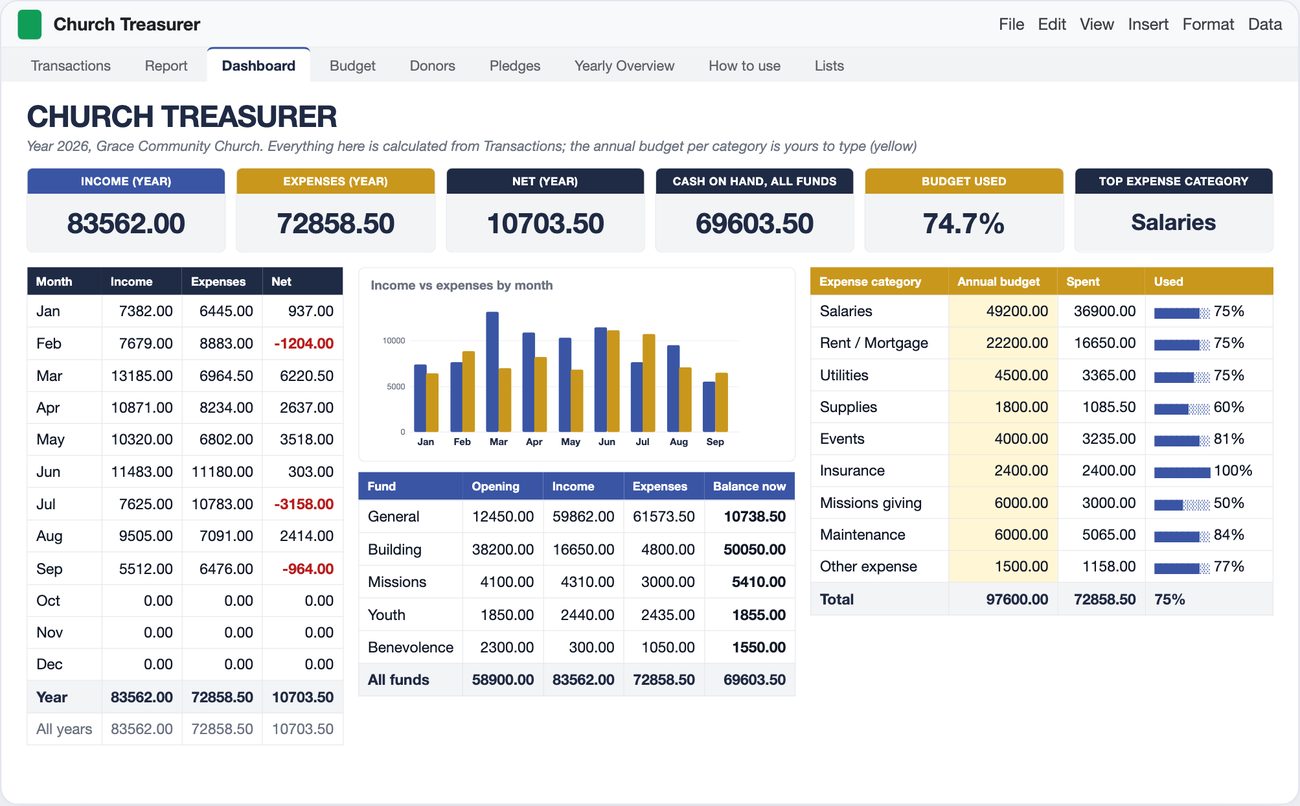
By the end of September the picture is sharper. Cash on hand across all funds is 69,603.50, but the General fund has dropped to 10,738.50 after a weak September (3,332 in, 6,476 out). General expenses average 6,841.50 a month, so the spendable balance is about a month and a half of operating costs. The dashboard tile says 69,603.50; the treasurer's real number is 10,738.50. A spreadsheet that mixes the two would show a comfortable church that is actually one bad quarter from a problem.
Benevolence is the only fund with a negative month: 2,300 at the start, one gift of 300, then 450 of rent help in March and 600 of utility assistance in August, so 1,550 now. The report shows the -600 in red without anyone adding it up.
Budget vs actual: on track, with one line at 100%
The annual budget lives on the Dashboard: nine expense categories, one yellow cell each, 97,600 in total. Spent is a SUMIFS per category for the year; Left and percent used follow. The budget-used tile is one division:
=IF(SUM($O$12:$O$23)=0, 0, H6 / SUM($O$12:$O$23)) ← expenses (year) / total budget
| Expense category | Annual budget | Spent (Jan-Sep) | Left | Used |
|---|---|---|---|---|
| Salaries | 49,200 | 36,900.00 | 12,300.00 | 75% |
| Rent / Mortgage | 22,200 | 16,650.00 | 5,550.00 | 75% |
| Utilities | 4,500 | 3,365.00 | 1,135.00 | 75% |
| Supplies | 1,800 | 1,085.50 | 714.50 | 60% |
| Events | 4,000 | 3,235.00 | 765.00 | 81% |
| Insurance | 2,400 | 2,400.00 | 0.00 | 100% |
| Missions giving | 6,000 | 3,000.00 | 3,000.00 | 50% |
| Maintenance | 6,000 | 5,065.00 | 935.00 | 84% |
| Other expense | 1,500 | 1,158.00 | 342.00 | 77% |
| Total | 97,600 | 72,858.50 | 24,741.50 | 74.7% |
Nine of twelve months is 75% of the year, and the total is at 74.7%, so the church is on plan. The percentages need reading, not ranking. Salaries and mortgage sit at exactly 75% because they are 4,100 and 1,850 every month. Insurance is at 100% because the annual premium was paid in one go. Missions giving is at 50% because Hope Clinic is supported quarterly, 1,500 in April and July, with October and January to come. The lines to watch are Maintenance at 84% with a quarter of the year left (the 4,800 roof repair) and Events at 81%, which will not survive a Christmas program without a transfer.
Pledges: why the donor name has to match
The Full file has a Pledges tab: donor, fund, amount pledged, optional start date for multi-year campaigns. Received is a SUMIFS on the donor's gifts to that fund in the report year, and the status is a two-level IF:
=IF(F6>=D6, "Fulfilled", IF(F6>0, "In progress", "Not started"))
| Donor | Fund | Pledged | Received | Left | % | Status |
|---|---|---|---|---|---|---|
| Anderson family | Building | 12,000 | 9,000 | 3,000 | 75% | In progress |
| James Whitfield | Building | 6,000 | 4,000 | 2,000 | 67% | In progress |
| Maria and Luis Ortega | Building | 3,000 | 1,000 | 2,000 | 33% | In progress |
| Sam and Priya Patel | Building | 2,500 | 0 | 2,500 | 0% | Not started |
| Robert Kim | Missions | 1,200 | 400 | 800 | 33% | In progress |
| Dorothy Ellis | Benevolence | 300 | 300 | 0 | 100% | Fulfilled |
The Patel row is the useful one. The Patels have given 3,000 this year in six checks of 500, all logged to the General fund, so their Building pledge shows Not started. Either the pledge was meant as general giving or the checks should have been tagged Building. The spreadsheet cannot know which, but it raises the question in September, not in January when the campaign closes.
Setting up the year
- Funds first. List the funds the church actually has, not the ones a template ships with. The sample uses General, Building, Missions, Youth and Benevolence. Anything given for a purpose is its own fund; everything else is General.
- Opening balances once. What each fund held on 1 January, typed on the Report tab. The sample's 58,900 across five funds is the only balance anyone ever types.
- Budget by year, per category. Salaries times twelve, the mortgage times twelve, last year's utilities plus a little. Quarterly and annual items go in at their full-year amount; expect the percentage to jump when they are paid.
- One tab all year. Do not start a new file for the new quarter. The month and year columns plus SUMIFS do the splitting, the same way a household annual budget keeps twelve months in one log.
- Report from the same file. Change the month cell, print, sign. The board gets the same layout every month, and the fund table answers the heater question before anyone asks it.
Skip the build
The formulas above are the skeleton: a month column, a SUMIFS grid for the report, a fund table and a budget table. The template is that skeleton with the rest attached: a Lite file with Transactions, Report and Dashboard for treasurers who want nothing else, and a Full file that adds Budget by month and quarter, a Donors tab that fills itself for thank-you letters, Pledges and a Yearly Overview by fund. Same columns in both, so you can move up any time.
Church Budget and Treasurer Report Spreadsheet for Google Sheets and Excel
Two files in one download: Lite (5 tabs: Transactions, Report, Dashboard, How to use, Lists) and Full (9 tabs, adding Budget, Donors, Pledges and Yearly Overview). Twelve fund slots, editable categories, a print-ready monthly report, sample data for a small congregation plus blank copies. Works for a PTA, club, HOA or small non-profit too: rename the lists.
Get the Church Treasurer Spreadsheet on Etsy →See it work
FAQ
What should a church budget template include?
Three things a personal budget does not have: funds (General, Building, Missions and so on, each with its own balance), a budget per expense category for the whole year with spent and left, and a monthly report the board can read on one page. In the sample file that is a Transactions tab with 262 rows, 5 funds, 9 expense categories with a 97,600 annual budget, and a Report tab that rebuilds itself for whichever month you pick.
What is the difference between designated and general funds?
General is the money the church can spend on anything: salaries, rent, utilities. Designated (or restricted) funds are gifts given for a purpose, such as a Building fund or Missions, and they can only be spent on that purpose. In the sample, cash on hand is 69,603.50, but 50,050 of it sits in the Building fund. The spendable General balance is 10,738.50, about a month and a half of General expenses.
How do fund balances work in a spreadsheet?
Type what each fund held on 1 January once. Every income row tagged with that fund adds to it, every expense row subtracts. Balance = opening + income to date minus expenses to date, one SUMIFS each. The Building fund in the sample: 38,200 opening + 16,650 received minus a 4,800 roof repair = 50,050.
How do I make a monthly treasurer report in Google Sheets?
Keep one Transactions tab with a Month and Year column calculated from the date. The report is a grid of categories with two SUMIFS per row: one for the chosen month, one for January through that month (year to date). Add a fund table with opening balance, income, expenses and balance at month end, then set the print area to one page. Change the month cell and the whole page updates.
Can the same church budget spreadsheet work for a PTA, club or small non-profit?
Yes, if the funds and categories are editable lists rather than hard-coded. Rename Building to Playground, Tithes to Dues, keep the same formulas. The sample Lists tab already has Dues, Donations, Fundraising and Grants as income categories for that reason. Single-entry, cash basis is enough for a treasurer reporting to a board; it is not accounting software and does not do payroll or tax forms.
More from the blog
- How to Price Handmade Products: Materials, Labor, Fees and ProfitA worked pricing example for handmade products: an 8 oz soy candle that costs 11.29 to make needs 23.99 on Etsy for a 40% margin after fees. Formulas, a price ladder from 20% to 70%, fee comparison and break-even.
- Home Bakery Pricing: Cost Per Serving, Cake Quotes and Your MarginHow a home bakery spreadsheet prices a cake by servings: 36 servings at 7.50 each, 342.38 with tax, a 50% deposit, and 173.67 of profit on a 149.33 cost, plus a bake plan built from confirmed orders.
- Side Hustle Bookkeeping: Profit and Loss in One TabHow a small business bookkeeping spreadsheet turns 35 income rows and 40 expenses into a monthly profit and loss: 12758.50 in, 4405.39 out, 8353.11 profit, a 65.5% margin and a quarterly tax set-aside.
- Subscription Tracker: What Your Subscriptions Cost Per YearWhat a subscription tracker spreadsheet shows for a list of 24 subscriptions: 310.32 a month and 3,723.87 a year once yearly, quarterly and weekly plans are normalized, 6 charges due in the next 7 days, a trial ending, and 5 unused subscriptions worth 875.63 a year.