 HeyPlanly
2027 Calendar Template in Google Sheets: Build Your Own Year Planner
A calendar is the one planner you can build entirely from formulas. Type a year in one cell, and the month grids, the week numbers and most public holidays can be calculated from it. Then one list of events fills the days. This walkthrough builds a 2027 calendar in Google Sheets (the same formulas work in Excel), and checks every formula against the real 2027 dates.
=DATE(2027,m,1)-(WEEKDAY(DATE(2027,m,1),2)-1); every other cell is the previous one plus 1. With Monday as the first day, May and August need six rows, February fits in four. Holidays like MLK Day (January 18) and Thanksgiving (November 25) come from an nth-weekday formula, not from typing.What 2027 looks like
Before any formulas, here is the year the formulas have to reproduce. January 1 is a Friday and so is December 31. There are 261 weekdays, 52 Saturdays and 52 Sundays, and only one Friday the 13th, in August. The table shows the weekday each month starts on and how many grid rows it needs.
| Month | Starts on | Days | Rows, week starts Monday | Rows, week starts Sunday |
|---|---|---|---|---|
| January | Friday | 31 | 5 | 6 |
| February | Monday | 28 | 4 | 5 |
| March | Monday | 31 | 5 | 5 |
| April | Thursday | 30 | 5 | 5 |
| May | Saturday | 31 | 6 | 6 |
| June | Tuesday | 30 | 5 | 5 |
| July | Thursday | 31 | 5 | 5 |
| August | Sunday | 31 | 6 | 5 |
| September | Wednesday | 30 | 5 | 5 |
| October | Friday | 31 | 5 | 6 |
| November | Monday | 30 | 5 | 5 |
| December | Wednesday | 31 | 5 | 5 |
The row count is why hand-drawn calendar templates break: a five-row grid loses May 31 and August 30 to 31 when the week starts on Monday. Give every month six rows and the question disappears.
The month grid from one date
Put the year in a Settings cell, say Settings!B1. For each month you need two helper values: the first day of the month, and how many cells to step back to reach the start of that week.
First day of March:      =DATE(Settings!$B$1, 3, 1)
Cells before the 1st:    =WEEKDAY(DATE(Settings!$B$1, 3, 1), 2) - 1
First cell of the grid:  =DATE(Settings!$B$1, 3, 1) - (WEEKDAY(DATE(Settings!$B$1, 3, 1), 2) - 1)
Every next cell:         =previous cell + 1
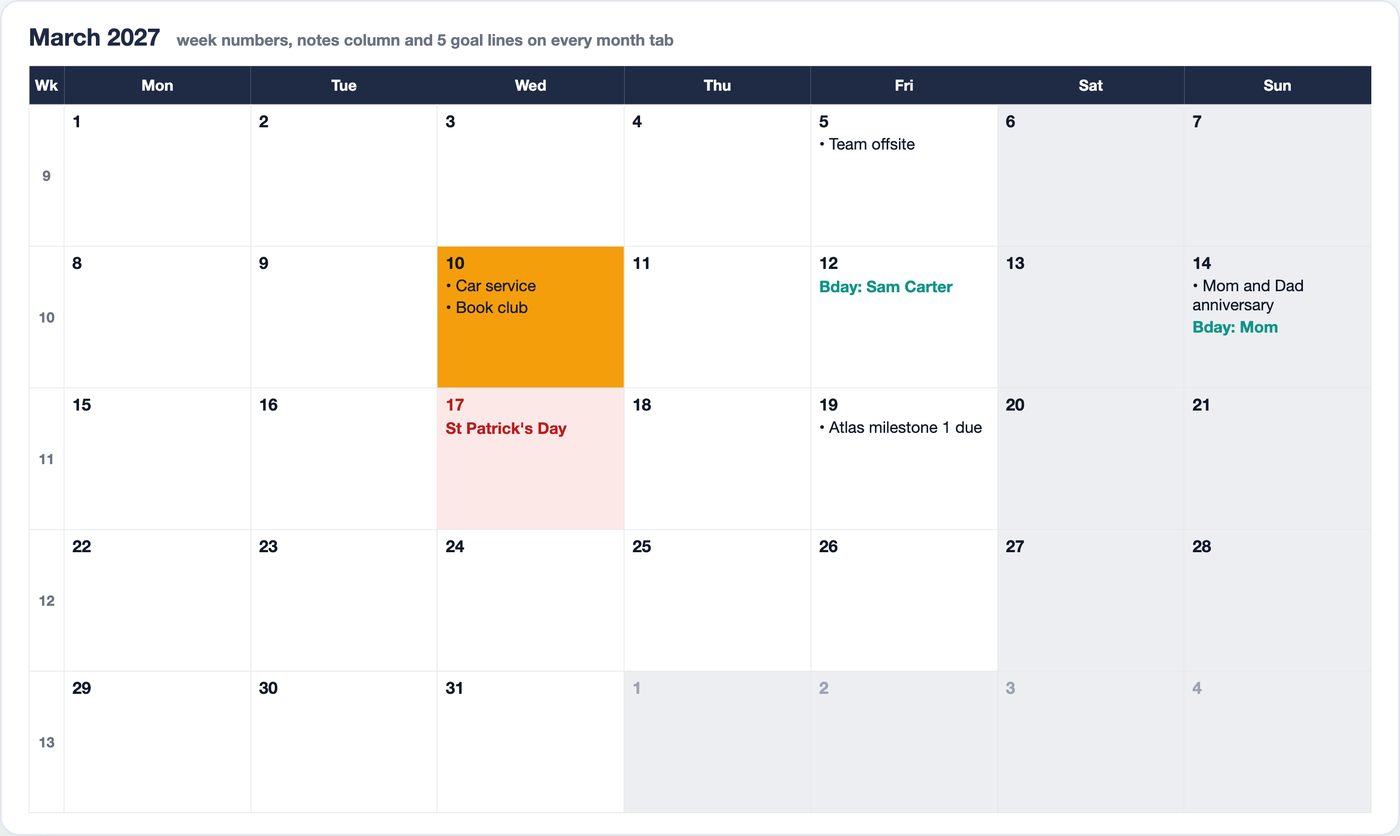
WEEKDAY(date, 2) returns 1 for Monday through 7 for Sunday. March 1, 2027 is a Monday, so the offset is 0 and the grid starts on the 1st. January 1 is a Friday: the offset is 4, and the January grid starts on Monday, December 28, 2026. For a Sunday-start calendar use WEEKDAY(date, 1) - 1 instead; the January grid then starts on Sunday, December 27.
Fill 6 rows of 7 cells this way and format them to show the day number only. Two conditional formatting rules finish the grid: grey text where =MONTH(C6)<>3 (days of the neighbouring months), and a highlight where =C6=TODAY().
Week numbers
For the column on the left, =ISOWEEKNUM(C6) on the first cell of each row is enough in Google Sheets and Excel 2013 or later. March 1, 2027 returns 9. Be ready for the first row of January: January 1 to 3 return 53, because those days belong to the last ISO week of 2026. Week 1 starts on Monday, January 4, and December 31 is in week 52.
Holidays by rule, not by typing
Fixed-date holidays are a plain DATE(year, 12, 25). The moving ones follow rules such as "third Monday of January", and a rule can be written as a formula:
nth Monday of a month (here: 3rd Monday of January, MLK Day):
=DATE(Y,1,1) + 7 - WEEKDAY(DATE(Y,1,1) - 1, 2) + 14

4th Thursday of November (Thanksgiving):
=DATE(Y,11,1) + 7 - WEEKDAY(DATE(Y,11,1) - 4, 2) + 21

Last Monday of May (Memorial Day):
=EOMONTH(DATE(Y,5,1),0) + 1 - WEEKDAY(EOMONTH(DATE(Y,5,1),0) - 7, 2)
The pattern: DATE(Y,M,1) + 7 - WEEKDAY(DATE(Y,M,1) - k, 2) is the first given weekday of the month, where k is 1 for Monday up to 7 for Sunday. Add 7 for the second, 14 for the third, 21 for the fourth. Replace Y with the year cell. Checked against 2027 and 2028:
| US federal holiday | Rule | 2027 | 2028 |
|---|---|---|---|
| Martin Luther King Jr. Day | 3rd Monday of January | Mon, Jan 18 | Mon, Jan 17 |
| Presidents' Day | 3rd Monday of February | Mon, Feb 15 | Mon, Feb 21 |
| Memorial Day | Last Monday of May | Mon, May 31 | Mon, May 29 |
| Juneteenth | June 19 | Sat (observed Fri, Jun 18) | Mon, Jun 19 |
| Independence Day | July 4 | Sun (observed Mon, Jul 5) | Tue, Jul 4 |
| Labor Day | 1st Monday of September | Mon, Sep 6 | Mon, Sep 4 |
| Columbus Day | 2nd Monday of October | Mon, Oct 11 | Mon, Oct 9 |
| Veterans Day | November 11 | Thu, Nov 11 | Sat (observed Fri, Nov 10) |
| Thanksgiving | 4th Thursday of November | Thu, Nov 25 | Thu, Nov 23 |
| Christmas Day | December 25 | Sat (observed Fri, Dec 24) | Mon, Dec 25 |
2027 is a year where the "observed" rule matters: Juneteenth, Independence Day and Christmas all fall on a weekend, and because January 1, 2028 is a Saturday, that holiday is observed on Friday, December 31, 2027. The rule is Saturday moves to Friday, Sunday moves to Monday:
=IF(WEEKDAY(D2,2)=6, D2-1, IF(WEEKDAY(D2,2)=7, D2+1, ""))
Easter is the exception. There is no short formula for it, so type Easter Sunday once per year (March 28 in 2027, April 16 in 2028) and derive the rest: Good Friday is that cell minus 2 (March 26, 2027), Easter Monday is plus 1 (March 29).
To show a holiday on the grid, look the cell's date up in the holiday list: =IFERROR(INDEX(Holidays!$C$2:$C$80, MATCH(C6, Holidays!$B$2:$B$80, 0)), ""), with dates in column B and names in column C.
One events list feeds every view
The mistake to avoid is typing events into the month grid. Keep them in one list (date, title, category) and let each view look them up. The list can then also calculate things a wall calendar cannot:
Days until:       =B6 - TODAY()
Flag:             =IF(B6=TODAY(), "Today", IF(B6<TODAY(), "Past",
                    IF(B6-TODAY()<=7, "This week", "Upcoming")))
Repeats yearly:   =DATE(Settings!$B$1, MONTH(B6), DAY(B6))
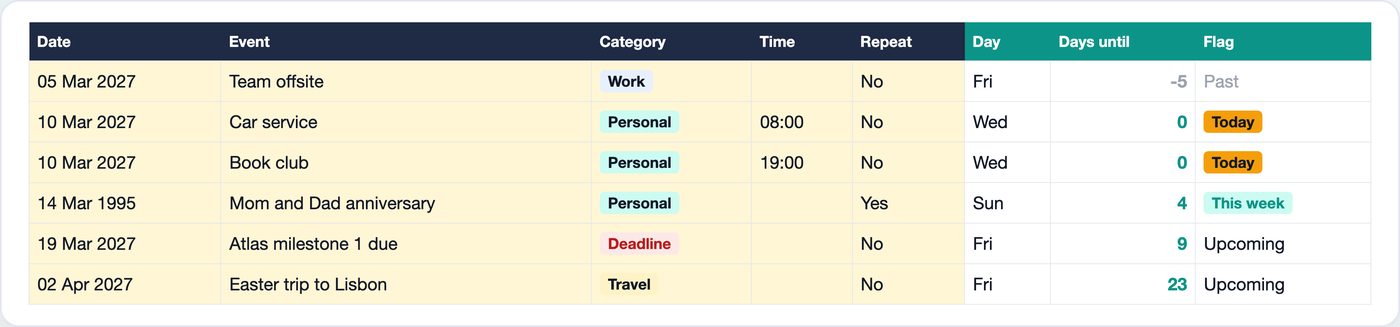
The third formula is what makes anniversaries work. In the sample an anniversary is entered with its original date, 14 March 1995, and marked as repeating. The formula moves it into the calendar year, so it shows up on Sunday, 14 March 2027, 4 days after the 10th, and will show up again in 2028 without retyping. Birthdays use the same trick, and the age is one subtraction: =YEAR(next birthday) - YEAR(date of birth). Someone born on 12 March 1988 turns 39 on 12 March 2027.
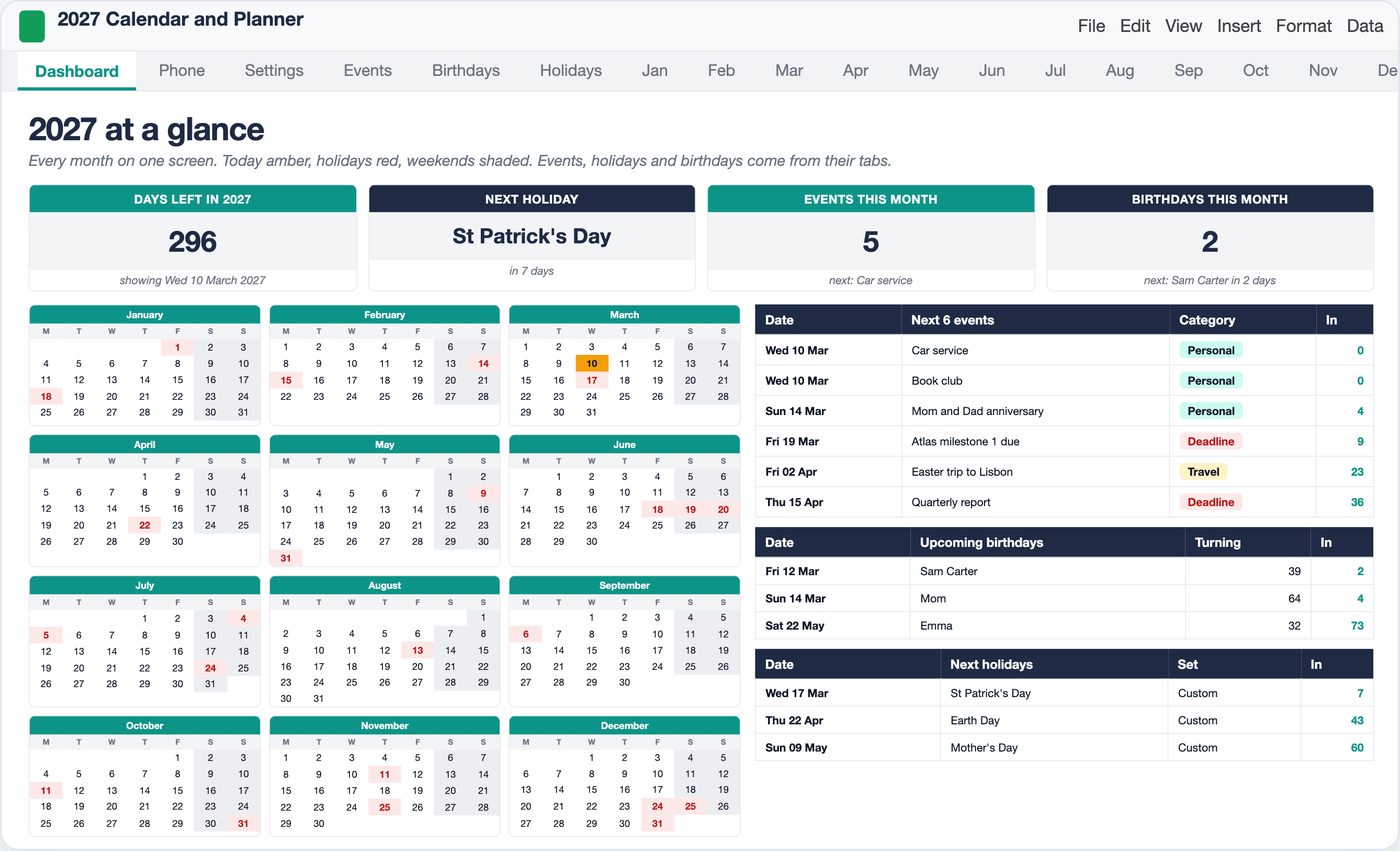
The sample file has 40 events across the year: 17 personal, 9 work, 7 travel and 7 deadlines, five of them in March. With the list in place, the year view becomes a set of counts and lookups rather than something you maintain:
If money dates are what you mainly want on a calendar, the bill calendar walkthrough uses the same lookup idea for due dates, and the annual budget for 2027 covers the numbers side of planning the year.
Skip the build
The grid, the holiday rules and the lookups above have to be repeated for twelve months, and most of the effort goes into edge cases like six-row months and observed holidays. The finished version is below.
2027 Calendar and Yearly Planner for Google Sheets and Excel
24 tabs built from one year cell: 12 month grids with week numbers, a year at a glance, Weekly, Goals, Countdown, a Phone tab and a one-page printable. Events (300 rows) and birthdays (60) land on every view. US federal, UK, Canada and Australia holidays by formula, plus 20 of your own. Type 2028 next year and it all moves.
Get the 2027 Calendar on Etsy →See it work
FAQ
What day of the week does 2027 start on?
January 1, 2027 is a Friday. The year has 365 days and ends on Friday, December 31. It has 261 weekdays (Monday to Friday), 52 Saturdays and 52 Sundays. In ISO week numbering, January 1 to 3 still belong to week 53 of 2026, and week 1 of 2027 starts on Monday, January 4.
How do I make a calendar in Google Sheets with formulas?
Put the year in one cell, then build each month from its first day. The first cell of a Monday-start grid is =DATE(year,month,1)-(WEEKDAY(DATE(year,month,1),2)-1), and every next cell is the previous one plus 1. Six rows of seven cells cover any month. Grey out the days of other months with a conditional formatting rule on MONTH.
How many rows does a month need in a calendar grid?
Five for most months, six for some, four for a February that starts on the first day of the week. In 2027 with Monday as the first day, May and August need six rows and February fits in four. With Sunday as the first day, January, May and October need six. A fixed six-row grid avoids the problem.
How do I calculate holidays like Thanksgiving or MLK Day in a spreadsheet?
Use a formula for the nth weekday of a month. The third Monday of January is =DATE(year,1,1)+7-WEEKDAY(DATE(year,1,1)-1,2)+14, which gives January 18 in 2027. The fourth Thursday of November is =DATE(year,11,1)+7-WEEKDAY(DATE(year,11,1)-4,2)+21, which gives November 25, 2027. Change the year and the dates move.
Can I reuse a 2027 spreadsheet calendar in 2028?
Yes, if every date is built from one year cell. Type 2028 and the grids, week numbers and rule-based holidays recalculate: MLK Day moves from January 18 to January 17, Thanksgiving from November 25 to November 23. Easter is the one date that has to be typed: March 28 in 2027, April 16 in 2028.
More from the blog
- How to Price Handmade Products: Materials, Labor, Fees and ProfitA worked pricing example for handmade products: an 8 oz soy candle that costs 11.29 to make needs 23.99 on Etsy for a 40% margin after fees. Formulas, a price ladder from 20% to 70%, fee comparison and break-even.
- Home Bakery Pricing: Cost Per Serving, Cake Quotes and Your MarginHow a home bakery spreadsheet prices a cake by servings: 36 servings at 7.50 each, 342.38 with tax, a 50% deposit, and 173.67 of profit on a 149.33 cost, plus a bake plan built from confirmed orders.
- Side Hustle Bookkeeping: Profit and Loss in One TabHow a small business bookkeeping spreadsheet turns 35 income rows and 40 expenses into a monthly profit and loss: 12758.50 in, 4405.39 out, 8353.11 profit, a 65.5% margin and a quarterly tax set-aside.
- Subscription Tracker: What Your Subscriptions Cost Per YearWhat a subscription tracker spreadsheet shows for a list of 24 subscriptions: 310.32 a month and 3,723.87 a year once yearly, quarterly and weekly plans are normalized, 6 charges due in the next 7 days, a trial ending, and 5 unused subscriptions worth 875.63 a year.