 HeyPlanly
Christmas Budget Planner: Gifts, Food and Travel in One Spreadsheet So January Does Not Hurt
Christmas is not one expense, it is about thirty of them across two months, paid by two people, in four stores and three apps. The overspend rarely comes from a single big gift. It comes from not knowing, on December 3, what is already committed. Here is how a Christmas budget spreadsheet answers that, with the sample numbers from the template.
Start from one number, then split it
The sample household sets a total holiday budget of 2,000 and plans it by category. Gifts are not typed here; they are the sum of the per-person budgets on the People tab. Everything else is a plain number.
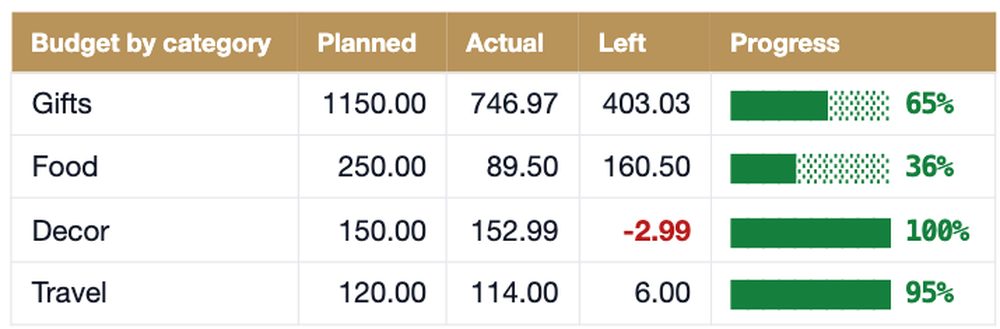
| Category | Planned | Actual (Dec 3) | Left | Used |
|---|---|---|---|---|
| Gifts (sum of 12 people) | 1,150.00 | 746.97 | 403.03 | 65% |
| Food | 250.00 | 89.50 | 160.50 | 36% |
| Decor | 150.00 | 152.99 | -2.99 | 102% |
| Travel | 120.00 | 114.00 | 6.00 | 95% |
| Cards | 40.00 | 38.90 | 1.10 | 97% |
| Charity | 75.00 | 75.00 | 0.00 | 100% |
| Other (wrap, photos, pyjamas) | 100.00 | 110.40 | -10.40 | 110% |
| Planned by category / total budget | 1,885 / 2,000 | 1,327.76 | 557.24 / 672.24 | 70% |
Two things to notice. The categories add up to 1,885, not 2,000: 115 is deliberately unallocated, because something always comes up. And the small categories are the ones already over. Decor is at 102% and Other at 110% three weeks before Christmas. Nobody overspends on decor on purpose; it is 34.99 of string lights, a 28.00 wreath, a 25.00 tree stand and a 65.00 tree, logged on four different days.

Each category's actual is one SUMIFS over the expenses log, where column C is the category and E the amount:
=SUMIFS(Expenses!$E$6:$E$205, Expenses!$C$6:$C$205, "Decor")
A gift budget per person, not one gift pile
"1,150 for gifts" is not a plan. "120 for Mom, 250 for Sam, 170 each for the kids" is, because when you find a 79.99 pair of earbuds for Dad you know instantly whether it fits his 130. The sample has 12 people (family, partner, two kids, a neighbour, a teacher, an office Secret Santa) and 28 gift ideas. Here is the People tab on December 3:
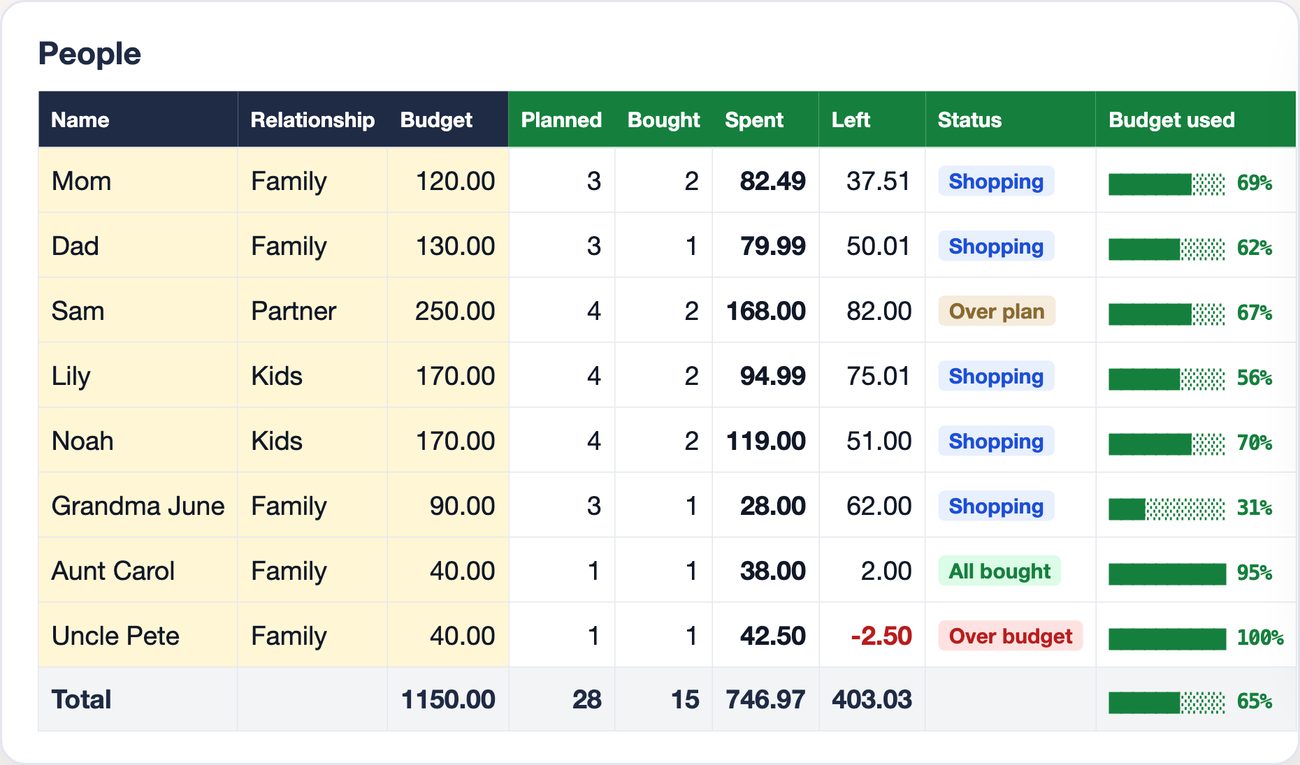
The status column is where the planning happens. Over plan (Sam: four gift ideas add up to 260 against a 250 budget) means you have to drop or shrink an idea before you buy. Over budget (Uncle Pete: BBQ tools were 42.50 against 40) means it already happened. The difference between the two is the difference between a budget and a receipt.
Per person, the counts are a COUNTIFS and the money a SUMIFS against the Gifts tab, where B is the person, H the Bought tick and M the amount actually spent:
Gifts bought:  =COUNTIFS(Gifts!$B$6:$B$155, B6, Gifts!$H$6:$H$155, "Yes")
Spent:         =SUMIFS(Gifts!$M$6:$M$155, Gifts!$B$6:$B$155, B6)
Left:          =D6-H6
The Spent column uses the actual price when there is one and falls back to the budget for a gift marked bought without a price, so the total never silently drops a purchase.
The number that decides January: still planned
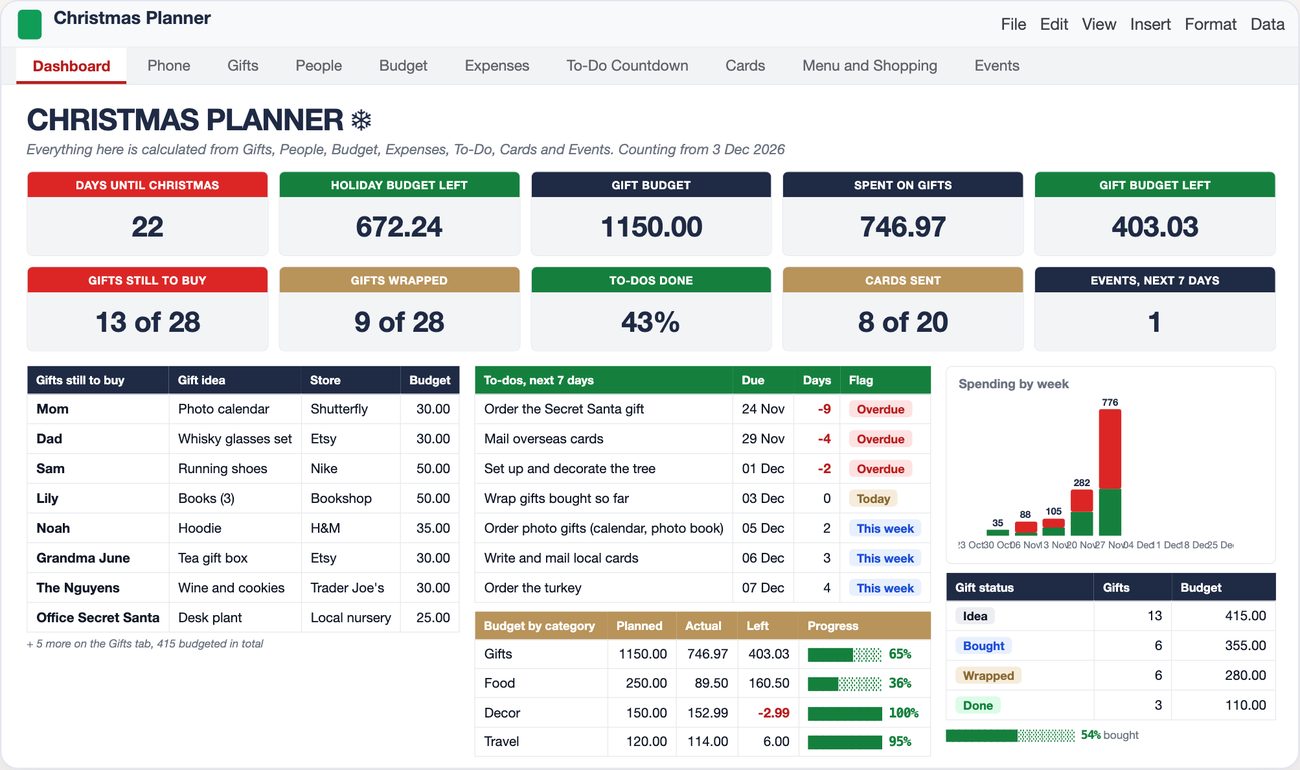
The dashboard says gift budget left 403.03. That is true and misleading. Thirteen gifts are still ideas, and their budgets add up to 415. So the plan, if bought as written, lands at 746.97 + 415 = 1,161.97 against 1,150: twelve over, before a single impulse buy at the checkout. The same logic applies to food: 89.50 spent, but the shopping list has 207 of items not yet bought (the turkey alone is 65), so food will finish around 296.50 against 250 planned.
| What is committed on Dec 3 | Amount |
|---|---|
| Already spent (all categories) | 1,327.76 |
| Gifts still to buy, at their budgets | 415.00 |
| Shopping list items not yet bought | 207.00 |
| Projected total | 1,949.76 |
| Total holiday budget | 2,000.00 |
| Real cushion | 50.24 |
672 left feels like room for a bigger gift. 50 left means the photo calendar for Mom is fine, and the 50.00 running shoes that put Sam over plan are the ones to rethink. This is the whole point of tracking planned budget per gift and not just what you paid. The formula for the still-planned total is one SUMIFS that sums every gift budget where the Bought tick is not Yes:
=SUMIFS(Gifts!$E$6:$E$155, Gifts!$H$6:$H$155, "<>Yes")
If you are paid every two weeks, the paycheck between now and Christmas is what has to cover the 622 still planned; the paycheck budget article shows how to see that per pay date.
Where the money actually goes: one week
The sample's spending by week (weeks ending on Thursday, ten weeks up to Christmas week) is 35, 88, 105, 282 and then 776 in the week of November 27 to December 3. That one week is 58% of everything spent so far: five gifts on Black Friday (79.99, 59.99, 35.00, 89.00, 30.00), a 150.00 weekend trip voucher on the 28th, plus the tree, the train tickets and the photo session. If you only look at the budget once, this is the week to do it, and the week you are least likely to.
The same expenses log gives the split between people. Every row has a Paid by value; the sample has 171.49 paid by Me, 71.00 by Partner and 296.00 Shared, which is what you need in January if one of you put everything on their card.
=SUMIFS(Expenses!$E$6:$E$205, Expenses!$F$6:$F$205, "Shared")
Tasks with a countdown, not a list
Budget is half of it. The sample has 40 tasks from November 1 to December 25, 17 done (43%) on December 3, and the dashboard shows the seven due in the next 7 days, three of them already overdue: order the Secret Santa gift (due Nov 24, 9 days late), mail overseas cards (Nov 29), decorate the tree (Dec 1). The days-left column is a subtraction from a "today" cell, and the flag is a nested IF:
Days left:  =C6 - Dashboard!$C$10          ← C10 is TODAY() unless you type a date
Flag:       =IF(F6<0,"Overdue",IF(F6=0,"Today",IF(F6<=7,"This week","Later")))
The sample uses a fixed December 3 as "today" so you can see the overdue state; clear that cell and the file counts from the real date. Cards work the same way: 20 on the list, 8 sent, and the addresses stay for next year.
Skip the build
The formulas above are the core: category totals, per-person gift budgets, the still-planned total and a task countdown. The template adds the Gifts log with Bought / Wrapped / Shipped, the People tab with a bar per person, the 7-category budget with planned vs actual, a 200-row expenses log with totals by payer, the to-do countdown, a card list, the menu with who brings what and a shopping list that feeds the food budget, events, and a Phone tab for the store.
Christmas Planner Spreadsheet for Google Sheets and Excel
Add the people you buy for and a budget each, type the total, then log gifts, expenses and tasks in the yellow cells. Spent, over or under, what is still to buy and the days-left countdown are calculated. 14 tabs, sample data inside, plus a blank copy. Any currency, any Christmas date.
Get the Christmas Planner on Etsy →If the holiday budget is one line in a bigger picture, the Annual Budget has sinking funds with an On track / Behind status, so next year the 2,000 is saved by November instead of borrowed in December. And if December already ended on a credit card, start with snowball vs avalanche.
See it work
FAQ
How much should I budget for Christmas?
There is no universal number; the useful question is how much you can spend without carrying it into January. Start from the total you can pay from December income and savings, then split it: gifts first (a budget per person, added up), then food, decor, travel, cards, charity and other. In the sample, 2,000 total becomes 1,150 for gifts and 735 for everything else, with 115 left unallocated as a buffer.
Why does my gift budget run out even though I stayed under it?
Because 'left' usually means budget minus what you have paid, and ignores the gifts you still plan to buy. In the sample the dashboard shows 403 left, but 13 unbought gifts carry 415 of planned budget, so the plan is already 12 over before the next purchase. Track planned budget per gift, not just spent.
Should groceries for Christmas dinner go in the gift budget?
No, keep them separate. Food is its own category: in the sample it is 250 planned, and only items marked as bought count as spent. Mixing food into the gift line makes the gift budget look overspent and the food budget invisible.
How do I split Christmas costs with a partner?
Give every expense a 'paid by' value (Me, Partner, Shared) and total by payer. The sample has 171.49 paid by Me, 71.00 by Partner and 296.00 Shared on the expenses tab. Gifts can be logged the same way if you buy for different people.
Can I reuse a Christmas budget spreadsheet next year?
Yes, and it is the main reason to use one. Keep the people, budgets and card list; clear the gifts, expenses and tasks. The Next Year tab in the template is for notes like 'bought the tree too late' or 'Uncle Pete does not need another BBQ tool', so next November starts from data, not memory.
More from the blog
- How to Budget a Biweekly Paycheck in Google Sheets (26 Paychecks, 12 Months of Bills)Why a monthly budget breaks when you are paid every two weeks, which months have three paychecks, and how to assign each bill to a paycheck with two formulas. Real numbers from the template.
- Debt Snowball vs Avalanche: Which Pays Off Debt Faster? (Same 5 Debts, Calculated)The same five debts run three ways in a spreadsheet: minimums only, snowball, avalanche. What actually changes the debt-free date, plus the Google Sheets formulas to check your own numbers.